If you want to improve the ability of your LLM, you can do so by giving it “skills” – text-based, specific instructions to behave in specific ways when specific triggers are activated. These are expert-like “methods” that dramatically improve performance in specific situations like marketing/branding work, planning, creative output-driven work, long-analysis with high uncertainty, and long-conversation problems.
I built 3 LLM skills that improve performance on complex thinking and creative work, which integrate well with a memory layer built out of different structures of data by simulating cognitive psychology models in LLM-readable formats. I expect these skills to structurally and functionally mimic some of the deeper cognitive processes that make human output unique.
This article introduces the concept of skills and provides a tutorial on the specific skills I’ve created, with use-case and implementation guidelines.
If you already know what skills are and how to implement them, look directly at the skills I introduced on my git.[1] If you like them, please do star the repo, contribute, or help me improve it with feedback.
You can also support it with a coffee donation 🙂[2]
- Why your LLM needs skills
- How the output improves by using skills
- Why skills: Key ways to improve LLM performance
- Other influences on LLM behavior
- Why I built these specific metacognition, creativity, and a run-time routing memory layer
- Cognition Today’s cognitive skills for AI creativity and meta-cognition
- What’s in each Skill
- When to use them
- Install
- ChatGPT install
- Cursor/Codex quick install
- Sources
- License
- Sources
Why your LLM needs skills
- Your LLM is getting stuck on a creative loop
- It no longer remembers whether you said something or it said something
- It repeats mistakes
- Its creativity and advice feel generic
- You feel it is not getting the “big picture” or the full context
- It doesn’t quite understand the difference between facts, assumptions, ideas, and conditions
These issues stem from the way LLMs build context and compress it. Skills dramatically change that.
How the output improves by using skills
- Likely to improve performance on cheaper/older models with less compute due to the structured nature of information processing
- Your LLM feels more intuitively aligned with how you are thinking as opposed to what you are saying explicitly
- It re-conceptualizes your problem in sophisticated ways instead of the most typical or input-driven analysis that may leave out subtleties
- It reduces your repeated instructions for the same thing and hopefully reduces the prompting burden on you.
Note: These are likely but not guaranteed. I invite anyone to benchmark and contribute 🙂
Why skills: Key ways to improve LLM performance
We talk about LLM capabilities like summarization, text/image generation, planning, internet search, researching context, or even using them as assistants for training, learning, content creation, etc. But those are capabilities, and within them, quality and execution can vary massively. That’s where skills come in and push them in the direction you need.
Generally, 3 things affect the quality of those capabilities:
1. The foundational model
Opus 5.0, GPT Astra, Kimi 2.0, etc. These are the specific names of particular foundational models trained on data, and their raw performance is evaluated on benchmark tests involving puzzles, math, interpretation, etc.
These models are typically praised for their “size,” meaning the number of neural network layers or parameters. Generally, bigger is better (but not necessarily true; I oversimplify, as there are many more optimizations that can outclass pure size).
Bigger models with more parameters, like billions or trillions, can learn nuances in their training data and develop high sensitivity to what a user tells them, viz. the prompt. Every few weeks, you hear about a new version of ChatGPT or Claude that is even more powerful. Those are upgrades to foundational models with more training data, more parameters, and more optimizations.
2. The user prompt
A specific instruction or set of instructions given to an LLM, like via chat in ChatGPT or Codex – like, “build me a website for my coffee brand – here’s the logo and tagline. Make it look premium and classy” or “write me a cover letter; here is my resume for this XYZ job”.
Generally, the clarity of instructions, constraints, clear formatting, explanations, methodology, and desired output qualities tend to make the LLM perform better. More details and constraints improve performance. Usually. Again, there are situations where user instructions can hinder performance, as the user may not input the best method to solve the problem or achieve their own goal (this is where human alignment matters a lot, in the sense that the AI is correctly able to interpret what the user wants).
E.g., rewrite this sentence using XYZ grammar in language homework – the user may be fundamentally wrong about XYZ grammar being suitable for a particular type of sentence and not even know it. So, a lot of the AI’s performance depends on what the user tells it.
3. LLM Skills
Skills are fundamentally text documents – usually 100-1000 words – saved as markdown files (skills.md) files that contain very, very specific instructions on ways to approach very specific problems. They are like expert how-tos and domain-specific methods. They contain protocols, guidelines, trigger events, conditional statements, and also examples/templates.
The goal of these skills is to automatically tell the LLM, by means of a “hidden prompt” – aka the contents of the skill- how the LLM should deal with a problem, when it should implement method A vs. B, or what steps to take when something appears in the user’s input. E.g., people build skills for marketing that contain specific instructions on how to market a certain product or how to alter a message based on specific demographics as per expert advice.
These skills are often mainly a Markdown file with additional JSON files (files that store data like Name: John Doe, Age: 45, with more sophistication) and helper text documents like installation instructions and contributors, and are hosted on a public platform like GitHub, from where you can download them.
Other influences on LLM behavior
Of course, more factors affect an LLM’s behavior: the MCP protocol, which connects external tools to an LLM, or a Harness, which is a full software system built with many skills, system instructions, file-storage instructions, and regular vanilla code to handle a user interface that customizes user interaction.
Then there is the system prompt, which almost no one can read directly because it’s securely hidden in these bigger models; they contain high-level, legally significant instructions that basically avoid harm, increase helpfulness, deny illegal requests, etc. Technically, these things control the perceived value of these LLMs: hidden prompts such as system instructions and skills, the file system these LLMs work in, and the environmental controls that come with the harness.
But,
The fascinating thing about skills is that they are the MVP of improving LLM behavior if you don’t want to get into technical things. So I will now do a quick introduction to the specific skills I’ve built using Cognition Today’s content on metacognition, creativity, decision-making, and memory processing.
Why I built these specific metacognition, creativity, and a run-time routing memory layer
My aim is to reduce computational requirements for high-demand thinking work. My core thesis is that a systematic way to simulate cognitive processes transforms information in ways humans find useful, rather than the brute-force chain of self-prompting LLMs use to solve long problems.
I covered unnecessarily theoretical details on improvisation, decision-making, memory systems, metacognition, and the hypothesized theoretical architectures involved on this site, which acts as a meta-explanation for “how people work”, but I now realize that that stuff might be more useful to LLMs than to people doing their daily tasks.
As I see it, LLMs are far from achieving the same processing that takes place when people think, since neural nets aren’t built for that kind of processing. However, after a long deliberation, I created a set of “cognitive skills” for LLMs to do complex reasoning and planning, and to manage your file system and data structures as a form of labile memory, that triggers when the complexity of work rises so that LLMs adopt a strategy first and eventually either save you tokens and/or improve the performance of open-source or older/cheaper models.
Best used for divergent thinking, long-context scenarios, simulations, frequent unstructured planning iterations, unorthodox output requests, etc.
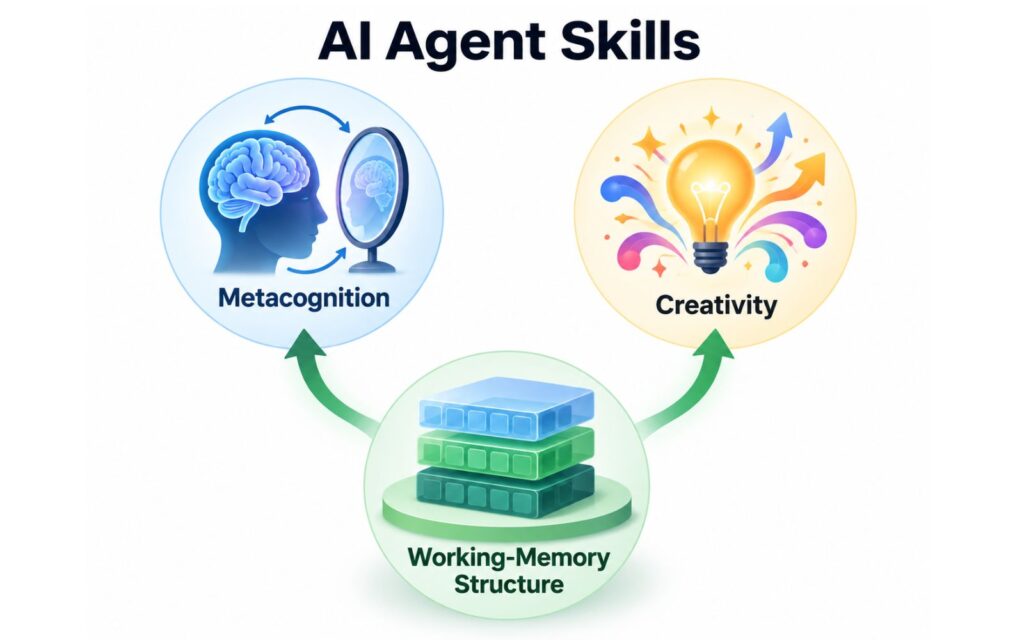
They are built as 1 core memory and data transformation structure, 1 core creativity processing unit, and 1 meta-cognition unit for prospective memory, assumptions, schemas, etc. Try these skills with Claude or Cursor, or even low-token, low-context-window open-source models. These skills structurally mimic deep cognitive features of human cognition in a way LLMs can understand.
Cognition Today’s cognitive skills for AI creativity and meta-cognition
This is a formal introduction of LLM skills that give a model explicit procedures for metacognition, creative cognition, and working memory. They come from Cognition Today articles by Aditya Shukla.
They simulate the structure of those functions — a monitoring loop, a decompose–recompose loop, two files that survive compaction.
Install one, two, or all three. None of them runs just because it is installed; they respond to triggers within your chat input, and all 3 work as a strong combination together.
What’s in each Skill
Get the full skill repo here[3]
Simulated Metacognition
This skill is a second look at how the work is being done, not another pass at the work itself. It asks: what are we actually deciding, what do we really know versus what just feels known, and what MVP change would help. Then it has to make that change in the answer — a plan, a check, a lower confidence, a different strategy — and see if anything moved. If the first decent reply would already satisfy you, this skill stays out.
It is a sorting of facts/info into known / told-by-you / guessed / assumed / missing; whether a memory problem is “I recognize the label but can’t produce the content,” “I have a fragment,” “too many similar options,” or “I don’t know”; and whether the job right now is to plan, evaluate, watch progress, pick a method, or just stop reflecting and do the task.
Triggering context: known vs assumed, familiarity, confidence, strategy, check, plan, gap.
Simulated Creative Cognition
This skill is for when the output is workable but still unsatisfactory. Like ten names that are the same name, a rewrite that is the last rewrite with new adjectives. It takes the thing apart into pieces, looks at it from farther away (what is this for) or closer (what is this made of), applies one or two specific moves, then rebuilds it as a few versions that differ in structure, not wording. Then it picks and stops. Your locked facts (canon, brand rules, constraints) survive every round.
Help me run this site with a donation :)

It is steered by things like what “better” means here (not always “weirder”); what must not change; how far to zoom out or in; which creative move fits the jam (stuck in a cliché, too many options, the wrong picture of the problem); and whether this is still exploring or already choosing. It will not hijack ordinary debugging unless two similar fixes have already failed.
Triggering context: take apart, rebuild, zoom out, zoom in, constraint, alternative, pick one, stop.
Simulated Working Memory
This skill is two notes files so a long session does not quietly invent decisions after the window compresses. One file is the scratch pad for right now (what we are doing, what’s locked, what’s next). The other is the durable log (approved choices, rejected paths, evidence, pointers). Ordinary work only touches the scratch pad. The log is updated only at a real stopping point, and never in the same step. If something was never written down, the skill has to say “I don’t have that,” not reconstruct a plausible version.
It decides which file to write; whether incoming mess must be turned into a table/schema before anything is picked from it; a small packet from the other skills (goal, which skill is active, what operation, what happens next).
Triggering context: scratch pad, decision log, freeze, resume, don’t invent, what was decided, what’s next.
When to use them
| Skill | Use it for | Skip it for |
|---|---|---|
Simulated Metacognitionmonitor-and-regulate-thinking[5] | Planning under uncertainty; telling familiarity from actual knowledge; personal or philosophical questions that need assumptions examined; a strategy that has stopped changing What it does: Separate assumptions, facts, hypotheses, ideas, targets, future conditions, etc. | SimpleFacts, formatting, fully specified plans |
Simulated Creative Cognitioncreate-through-recomposition[6] | Naming and brand systems; fiction under canon constraints; design that has gone generic; ideas that must differ in structure, not wording; a technical deadlock after two similar fixes. What it does: Break down a problem into cohesive components, apply rules of creativity, and recombine to create unique creative output. | Deterministic edits, first-pass debugging, one known procedure |
Simulated Working Memorymanage-working-context[7] | Multi-session projects; work that will hit a context compaction; approved decisions that keep getting reverted; reducing a large dump without losing who said what. What it does: Expand your file system to have statically stored information that updates and transforms information as an external data structure to preserve critical information and processes. | Short tasks, single questions, chats where nothing was decided |
The first two work without the third. The third is the shared runtime for long work and ideal if you use AI via CLI, Claude Code, Cursor, or Codex-type harnesses. You don’t need the 3rd for ChatGPT integration.
Good fit: writers, researchers, designers, analysts, and anyone running long, judgment-heavy agent sessions.
Poor fit: fast factual answers, routine transform/generation work, and tasks that already have one correct procedure.
Benefits of using all 3 together
- Advanced thinking strategy
- Clearer understanding of facts, assumptions, plans, knowledge gaps
- Long-context friendly file management and memory schema
- Divergent thinking for less llm-like sloppy creativity
Install
Copy the whole skill folder, not only SKILL.md. Details for Cursor, Claude Code, Codex, and other Agent Skills clients: INSTALL.md[8].
git clone https://github.com/shredwarrior/cognition-today-skills
cd cognition-today-skills
.\tools\install.ps1
git clone https://github.com/shredwarrior/cognition-today-skills
cd cognition-today-skills
chmod +x tools/install.sh
./tools/install.shThat puts the three folders in ~/.cursor/skills/. Restart Cursor and check Customize → Skills. Invoke with /monitor-and-regulate-thinking (or the other folder names) if you want to force one on.
Works with any client that reads the Agent Skills[9] layout (skills/<name>/SKILL.md).
ChatGPT install
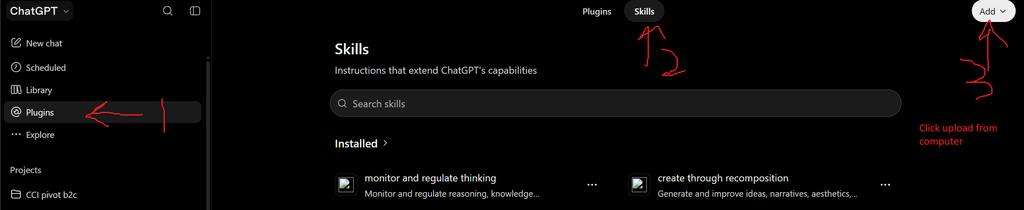
- Click on the left menu and select plugins.
- Click on the second tab next to plugins called “skills”
- Click the white Add menu to select “Upload from computer”. This is where you select your skills.md file.
Note: This file is often nested inside the root folder of the specific skill folder. It can be multiple folders deep, so inspect the skill folder.
For ChatGPT integration of Cognition Today skills, you only need 2 skills individually. Upload them 1 by 1.
- Simulated metacognition: Monitor and regulate thinking – download this file[10] exactly from git and upload it
- Simulated creative cognition: Create through recomposition – download this file[11] exactly from git and upload it
Cursor/Codex quick install
Method 1
- Provide the LLM with the git link to the whole repo[12], and it’ll install the full package and its dependencies.
Method 2
Cursor
- Copy these three folders from the repo’s
skillsdirectory into%USERPROFILE%\.cursor\skills\
monitor-and-regulate-thinking·create-through-recomposition·manage-working-context - Fully quit Cursor and reopen it.
- Sidebar → Customize → Skills. You should see all three.
Claude Code
- Copy the same three folders into
%USERPROFILE%\.claude\skills\ - Quit the Claude Code session and start a new one.
- Type
/in the chat. The three skill names should be in the list.
Sources
- Metacognition — Metacognition & Metamemory Explained
- Creative cognition — Construal Level Theory, 15 Ways to Trigger Creative Thinking, Decompose & Recompose
- Working memory — Memory Models in Psychology, A Thrifty Brain
Each skill folder maps every operational rule to its source in references/source-map.md.
License
CC BY-NC-SA 4.0[13] — source-available for noncommercial use, with attribution. Not an OSI open-source license.
Not medical, psychological, legal, or other professional advice. Do not use these skills to diagnose a person or to claim that an agent has human mental states.
Aditya Shukla — Cognition Today · GitHub[14] · LinkedIn[15] · support[16]
Cite with CITATION.cff[17]. Contribute via CONTRIBUTING.md[18].
Text documents within a folder that contain specific instructions and methods to deal with a specific type of problem or context, like expert advice or expert procedures.
1. Typically, you start with an expert-level, context-rich method or procedure. Write it down as text or markdown. Document that, refine it, and improve the core procedure.
2. Then use an LLM interface like ChatGPT or Claude to turn your expert procedure into a skill. You can give the LLM additional links or instructions. It will then convert your core procedure, with context, into a file/document system as a skill that language models can read and share.
3. Most people just upload that folder/file system to GitHub and share the repo link.
Tip: You can tell an LLM you want to create a skill on XYZ and it’ll create it through a chat, or ChatGPT plugins–> Skill –> Add –> Create skill via chat option will do it.
Method 1: Tell, via a prompt to Claude, Cursor, or Codex (or equivalents) – install these skills on my machine from this link. Done.
Method 2: Copy the folders into the skills folder for your LLM harness
Method 3: Follow the specific ChatGPT or Codex interface settings to upload the skill file
Ideally, you share the folder that an LLM creates for a specific hand-written or chat-based core “structure” of your skill via github.
On Github, or google search skill-related Keywords + LLM Skill for Cursor/ChatGPT/Claude. Or make them based on some expert procedure you have access to.
Get the full skill package here.[19]
Do test it and share your findings, this will be an actively maintained repo and I’ll add more skills later.
Sources
[2]: https://buymeacoffee.com/adityashukla
[3]: https://github.com/shredwarrior/cognition-today-skills
[4]: https://github.com/shredwarrior/cognition-today-skills#when-to-use-them
[5]: https://github.com/shredwarrior/cognition-today-skills/blob/main/skills/monitor-and-regulate-thinking
[6]: https://github.com/shredwarrior/cognition-today-skills/blob/main/skills/create-through-recomposition
[7]: https://github.com/shredwarrior/cognition-today-skills/blob/main/skills/manage-working-context
[8]: https://github.com/shredwarrior/cognition-today-skills/blob/main/INSTALL.md
[9]: https://agentskills.io/specification
[10]: https://github.com/shredwarrior/cognition-today-skills/blob/main/skills/monitor-and-regulate-thinking/SKILL.md
[11]: https://github.com/shredwarrior/cognition-today-skills/blob/main/skills/create-through-recomposition/SKILL.md
[12]: https://github.com/shredwarrior/cognition-today-skills/tree/main
[13]: https://github.com/shredwarrior/cognition-today-skills/blob/main/LICENSE.txt
[14]: https://github.com/shredwarrior/
[15]: https://www.linkedin.com/in/aditya-shukla-1b8614ba/
[16]: https://buymeacoffee.com/adityashukla
[17]: https://github.com/shredwarrior/cognition-today-skills/blob/main/CITATION.cff
[18]: https://github.com/shredwarrior/cognition-today-skills/blob/main/CONTRIBUTING.md
[19]: https://github.com/shredwarrior/cognition-today-skills

Hey! Thank you for reading; hope you enjoyed the article. I run Cognition Today to capture some of the most fascinating mechanisms that guide our lives. My content here is referenced and featured in NY Times, Forbes, CNET, and Entrepreneur, and many other books & research papers.
I’m am a psychology SME consultant in EdTech with a focus on AI cognition and Behavioral Engineering. I’m affiliated to myelin, an EdTech company in India as well.
I’ve studied at NIMHANS Bangalore (positive psychology), Savitribai Phule Pune University (clinical psychology), Fergusson College (BA psych), and affiliated with IIM Ahmedabad (marketing psychology). I’m currently studying Korean at Seoul National University.
I’m based in Pune, India but living in Seoul, S. Korea. Love Sci-fi, horror media; Love rock, metal, synthwave, and K-pop music; can’t whistle; can play 2 guitars at a time.

We now rely on your support to run this site. Please donate if you find it useful:)
Help me run this site with a donation :)